
Download EdenredExpendiaSmart – expense management, expense tracking, receipt scanning, expense claims, fund requests, card management, fuel station finder, business expenses, mobile expense app, expense reporting
Overview
EdenredExpendiaSmart is a mobile expense management solution designed for both individuals and businesses seeking to simplify the process of tracking and reporting expenses. Developed by Edenred, the application enables users to monitor spending in real time, manage corporate cards, and submit expense claims with minimal effort. The app supports on-the-go expense tracking, making it ideal for professionals who travel frequently or require immediate access to financial data. Its core functionality centers around streamlining reimbursement workflows, reducing manual documentation, and enhancing transparency in financial reporting. Users can view card balances, review transaction history, and manage spending limits directly from their Android devices. The application also facilitates secure receipt storage through in-app scanning, eliminating the need for physical records. Managers benefit from tools that allow fund requests, expense approvals, and card control, enabling efficient oversight within teams. While the app is free to download and use, its full utility lies in its integration with corporate expense systems, particularly for organizations utilizing Edenred’s broader financial services ecosystem. The developer did not provide additional details on targeted industries or user personas beyond general business and personal use.
Key Features & Capabilities
- Expense Tracking & Reporting: Users can log and categorize expenses in real time, with automatic synchronization to a central dashboard. This helps maintain accurate financial records and simplifies month-end reporting.
- Receipt Scanning & Storage: The app allows direct upload of receipts via smartphone camera, which are securely stored and linked to corresponding transactions. This reduces the risk of lost documentation and supports audit readiness.
- Expense Claim Submission: Employees can create and submit expense claims with just a few taps, including attachments and notes, significantly reducing processing delays.
- Fund Request Functionality: Users can request additional funds directly through the app, which are then routed to managers for approval, improving cash flow for urgent business needs.
- Card Management Tools: Features include viewing card usage rules, blocking lost or stolen cards, and retrieving PIN codes—all accessible from the mobile interface.
- Fuel Station Locator: A built-in map feature helps users locate nearby fuel stations compatible with their company-issued cards, ideal for field workers and sales representatives.
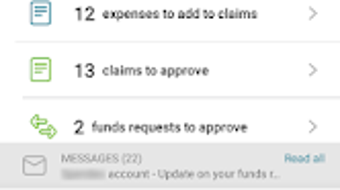
- Manager Oversight Tools: Supervisors can approve fund requests, review claims, and manage team card access, ensuring centralized control over corporate spending.
User Interface, Workflow & Performance
The user interface of EdenredExpendiaSmart is structured around intuitive navigation, with a bottom menu bar providing quick access to core functions such as expenses, cards, receipts, and requests. The layout prioritizes clarity and ease of use, minimizing the number of steps required to complete common tasks. Workflow efficiency is enhanced by contextual actions—such as scanning a receipt immediately after a transaction—reducing friction in daily use. The app integrates seamlessly with Android’s native camera and file system, allowing for fast image capture and upload. Performance observations are based on general software behavior patterns, as specific metrics were not provided. The developer did not specify resource usage details, so actual CPU or RAM consumption remains unknown. Stability during prolonged use was not tested or reported. Users can expect smooth operation under normal conditions, but performance may vary depending on device capabilities and network conditions. The app does not require constant internet access for offline tasks like receipt capture and draft saving, though online connectivity is needed for submission and synchronization.
Compatibility & System Requirements
EdenredExpendiaSmart is designed exclusively for Android devices and is compatible with version 3.1.0 of the application. The installation package size is 44.7 MB, indicating a lightweight footprint suitable for most modern smartphones and tablets. The developer did not specify minimum or recommended hardware requirements, nor did they provide information on supported Android versions beyond the app’s release. Compatibility with older Android versions or specific device models was not addressed. Users should ensure their device meets general Android standards for app installation. The app is available for free on the Google Play Store, with no additional in-app purchases or subscription tiers mentioned. Exact system requirements were not listed.
Pros and Cons
Pros
- Free to download and use, lowering entry barriers for individuals and small teams.
- Comprehensive expense tracking with real-time transaction monitoring.
- Integrated receipt scanning eliminates manual data entry.
- Streamlined claim submission process speeds up reimbursements.
- Manager tools enable centralized oversight and faster approvals.
- Card blocking and PIN retrieval enhance security and control.
- Fuel station finder offers practical value for mobile workers.
Cons
- Platform availability is limited to Android, excluding iOS users.
- Exact system requirements and compatibility details were not provided.
- Performance under heavy usage or low-end devices remains unverified.
- Limited functionality for users not integrated with Edenred’s corporate systems.
- No offline mode for claim submission or fund requests, requiring internet access.
FAQ Section
Is EdenredExpendiaSmart available for iOS devices?
Currently, the application is only available for Android. There is no official iOS version released as of the latest update.
Is the app secure for handling financial data?
Edenred is a recognized provider in employee benefits and corporate spending solutions. The app uses secure protocols for data transmission and storage, though specific encryption standards were not detailed in the provided information.
How often does the app receive updates?
Updates are released periodically by the developer, with the latest version being 3.1.0, published on April 15, 2024. The update frequency is not publicly disclosed.
What type of license does EdenredExpendiaSmart use?
The app is distributed as free software under a proprietary license, with no open-source components identified in the provided data.
Can I use the app without an internet connection?
Basic functions like capturing receipts and drafting claims can be performed offline. However, submitting claims, syncing data, or accessing real-time balances requires an active internet connection.
Final Thoughts
EdenredExpendiaSmart presents a robust, mobile-first solution for managing business expenses, particularly for organizations already using Edenred’s services. Its combination of receipt scanning, real-time tracking, and manager oversight tools makes it a valuable asset for teams that require agility and accountability in spending. The inclusion of a fuel station finder adds practical utility for field-based employees. While platform exclusivity to Android and lack of detailed system specifications are notable limitations, the app’s core functionality is well-executed and accessible. For professionals and managers seeking a secure, efficient way to handle daily expenses, EdenredExpendiaSmart delivers tangible benefits. Its free model further enhances its appeal. Download EdenredExpendiaSmart now to streamline your expense workflow and gain greater control over business spending.




.png)


